Winter & Spring Break Camp
No school? No problem! The JCCSF offers camps year-round, and our Spring & Winter Break Camps are packed with fun to keep kids happy, moving, and making new friends, so you can enjoy a little downtime, too.

Winter Break Camp Coming Soon!
PROGRAM DATES:
Session 1: December 21 – December 24, 2026
Session 2: December 28 – December 31, 2026
Registration Coming Soon!
School’s out, adventure is in! Make this Winter Break one to remember with exciting camp days filled with creativity, discovery, movement, and plenty of fun at the JCCSF!
One day or a whole week? You choose! With flexible single-day and full-week registration options, it’s easy to find the perfect fit for your family’s schedule while keeping kids active, engaged, and connected all break long.
From colorful creations and hands-on experiments to friendly competition and new adventures, campers will explore their interests, build confidence, make friends, and discover something new every day.
Camp Details
Grades K – 5 (Ages 5 – 11)
Hours: 8:35 am – 4:00 pm
Session Rate // $520
AM Care: 8:00 – 9:00 am // $85
PM Care: 4:00 – 6:00 pm // $175
*No camp on December 25 or January 1 for holidays.
Choose Your Winter Break Adventure!
There’s something for every curious mind and energetic camper:
🎨 Art Adventures – Let imaginations run wild with hands-on creativity and colorful projects.
♟️ Chess – Make your next move! Build strategy, sharpen problem-solving skills, and enjoy friendly competition.
🔬 Silly Science – Get curious, experiment, and discover the wow factor behind science.
🏀 Basketball – Hit the court, practice your skills, and bring your best team spirit.
Plus, we’ll head outdoors for fresh air and more fun whenever the weather allows!
Made for Every Camper
Campers are grouped by grade level, with age-appropriate activities designed to inspire curiosity, encourage friendships, and help every child shine. Winter Break only comes once a year. Let’s make every day count!
If your first choice of camp is full, sign up for our waitlist! Waitlisted spots will be offered on a first-come, first-served basis.
Note: Family Fitness Center Members and Family Community Members receive 10% discount on the Public rate
Are you a JCCSF member? Save even more with a Community Membership!
Looking for financial assistance? Complete the Youth Financial Assistance Application.


IMPORTANT CAMP DETAILS
Refunds and Changes
In order to make changes, please email [email protected]. Read our policies in full.
There are no refunds or reductions in fees for days missed due to illness, absence, vacations, suspensions, dismissal, or change in family circumstance during Camp sessions. There is a $40 transfer fee per change for switching the sessions and/or programs for which your child is registered after initial enrollment, except for changes resulting from changes in waitlist status. Transfer fees must be paid in full at time of transfer.
Extended Care
Campers in AM Care may arrive anytime between 8:00 – 9:00 am. Parents or guardians must bring campers inside the building and sign them in each morning. You may not leave your child unattended in the building or drop them off in front of the building.
Campers in PM Care will be brought to their extended care counselor at 3:45 pm. You may pick up your camper from PM Care at your convenience between 4:00 and 5:30 pm by going to the Youth & Family Office on the 3rd floor. You will be asked to provide an ID when signing your camper out. PM Care drive-through is at Walnut St. from 5:45 – 6:00 pm. Please see the below drop down on drive-through for more details. If you need to pick up your camper at the earlier drive-through, please call the Camp Hotline (415.563.6608) to inform Camp staff.
First Day Check-In
Check-in is in the atrium at 3200 California Street, and begins at 8:35 am. You must walk your camper into the classroom after check-in. Campers will be allowed into the rooms at 8:35 am.
If your camper is enrolled in AM Care, check-in in the Youth & Family Office on the 3rd floor any time between 8:00 – 8:40 am. After 8:40 am please check-in in the atrium. To add extended care, please complete our online registration process.
DASHBOARD PLACARDS
Complimentary parking is available in our garage for 30 minutes during drop-off and pick-up times. Curbside drop-off and pick-up is available at our drive-through location (see below).
Drop-Off Procedures
Morning curbside drop off takes place on Walnut Street from 8:35 – 8:55 am. Families are also welcome to park and bring their child up to their camp room. Camp rooms open at 8:40 am.
Some helpful tips:
For safety, you may only enter by making a right turn onto Walnut Street from California Street and turning right into our curbside drop-off. You will not be allowed to make a left turn into the curbside drop-off if you are coming south from Sacramento Street.
Make sure that you display your parking placard on your dashboard so that camp and security staff can easily identify you as a camp family and help facilitate your curbside process. Please be sure your camper’s name is clearly written.
Be prepared to show valid ID for when signing out your camper.
If you are driving, please do not get out of your car. Camp staff will be available to open the door and help your camper into their car seat or seatbelt.
If you are arriving by public transportation, bicycle or walking, you may walk to the curbside pickup from the pedestrian gate on California Street, just west of the garage entrance.
Pick-Up Procedures
If you are picking up more than one camper, and those campers have different drive-through times, you can pick all of your campers up in the later assigned time slot. We will confirm this logistic at check-in on the first day of camp. Curbside pickup is available at our Walnut Street drive-through from 3:40 – 4:00 pm.
If you have not picked up your camper by the end of your pick-up time, your child will be taken to the office where they will wait while we try to reach you.
Some helpful tips:
For safety, you may only enter by making a right turn onto Walnut Street from California Street and turning right into our curbside drop-off. You will not be allowed to make a left turn into the curbside drop-off if you are coming south from Sacramento Street.
Make sure that you display your parking placard on your dashboard so that camp and security staff can easily identify you as a camp family and help facilitate your curbside process. Please be sure your camper’s name is clearly written.
Be prepared to show valid ID for when signing out your camper.
If you are driving, please do not get out of your car. Camp staff will be available to open the door and help your camper into their car seat or seatbelt.
If you are arriving by public transportation, bicycle or walking, you may walk to the curbside pickup from the pedestrian gate on California Street, just west of the garage entrance.
Absences/Early Pickup
If you wish to pick up your camper early, we ask that you please come and pick them up in the camp office. Early pick-up will not be available after 3:15 pm.
Remini App: What Camp Families Need to Know
To help make Winter Camp check-in, pick-up, and communication as smooth and secure as possible, the JCCSF Camp Team is using the Remini app. Remini allows families to complete required forms, manage authorized pickups, and stay connected throughout the camp session.
Below you’ll find step-by-step instructions and helpful FAQs to get you started.
Getting Started with the Remini App
Step 1: Look for Your Welcome Email
Families will receive an email from [email protected].
The email is sent to Parent/Guardian 1 listed on your camp registration.
Step 2: Download the App
- Tap the link in the email to open the app store on your iPhone or Android device
- If you open the link on a computer, it will launch the browser version of Remini
- If you don’t see the app right away, search the app store for:
“Remini – Schools & ECC”

Step 3: Register Your Account
- Open the app and select Register
- Sign up using the same email address you used for camp registration
- Once registered, you’ll see all campers and camps associated with your account
Completing Camp Questionnaires & Friend Requests
Camp Questionnaire Forms must be completed for each camper before camp begins.
- Open the Remini app (or browser version)
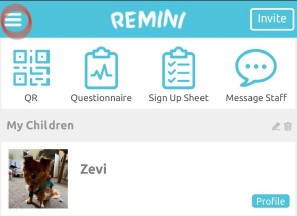
- Tap the three lines in the top left corner
- Select Forms from the menu
- Choose the form you’d like to complete
- When submitting, select the specific camper the form applies to
- Repeat for each child, if applicable

Adding Authorized Pickups
For your child’s safety, all authorized pickups must be entered in Remini.
- Open the Remini app (or browser version)
- Tap the three lines in the top left corner
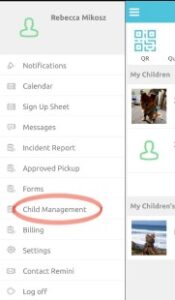
- Select Child Management
- Scroll down and choose Add Contact
- Select Approved Pickup
- Answer Yes to “Enable user to check child in/out?”
- Enter the required information and click Save
After Saving:
- Scroll to the bottom of the page to find the new contact
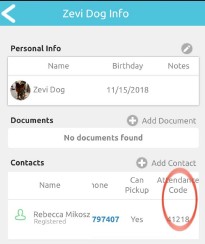
- Scroll to the right to locate their 5-digit pickup code
- Share this code with the pickup person
At pickup, authorized adults must present either the 5-digit code or a physical ID.
**If you cannot find your code, click on the Menu, the 3 lines in top left corner of Remini home page:
Click on “Child Management”
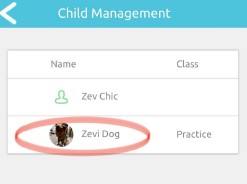
Click on your child’s name
Find Attendance Code beside your name. You may need to scroll over (hover over your email address and scroll the data to the le so you can view the Attendance Code column).
Remini App Frequently Asked Questions
Why is the JCCSF using the Remini app?
Is the Remini app required?
What email do I use to register?
What if I don’t see my child listed?
Can I complete forms on a computer?
Do I need to fill out forms for each child?
Who can pick up my child from camp?
Can I add or update pickups during the summer?
What if my authorized pickup forgets their code?


Thank You To Our Sponsors

Related Programs

JCCSF Swim School

Summer Camp

Playdate

Get in Touch
Contact Us
Have a question about Spring Break Camp? Reach out to our team — we’d love to hear from you!